Today, we are diving deep into the code, the art, and the ideas behind our latest and most highly anticipated update: Level 9: Frozen Echoes.
If you have played the game, you know that each level brings a unique theme and a new set of challenges. We have survived haunted mansions, navigated digital cyber-cities, and battled through neon wastelands. But for Level 9, I wanted to do something completely different. I wanted to build an environment that felt incredibly harsh, yet breathtakingly beautiful.
In this developer log, I am going to explain exactly how I made this action-packed level, the technology that powers it, and why I firmly believe it is the most beautiful, cool, and dangerous stage in the entire game.
The Core Concept: Why "Frozen Echoes"?
When brainstorming Level 9, I asked myself: What is the opposite of the chaotic, fast-paced, flashing neon lights of the previous levels? The answer was coldness. Stillness. Absolute zero.
I came up with the idea of the "Absolute Zero Sector", a deep, dark, and freezing digital cave where ghosts don't just glitch around; they haunt the frozen landscape like echoes of the past. The goal of the game remains the same—hunt the ghosts and shatter the anomalies—but the feeling of the game has shifted.
Instead of aggressively "deleting" ghosts, you are "freezing" Frost Phantoms. Instead of clearing data buffers, you are "shattering" Ice Anomalies. This small shift in the game's vocabulary and theme completely changes how the player experiences the action.
Why Level 9 is the Most Beautiful and "Cool" Level Yet
I often tell players that Level 9 is my absolute favorite, and it all comes down to the visual design. It is simply the most beautiful and atmospheric level we have built, and ironically, it is exactly the "coolest" level because of its ice theme!
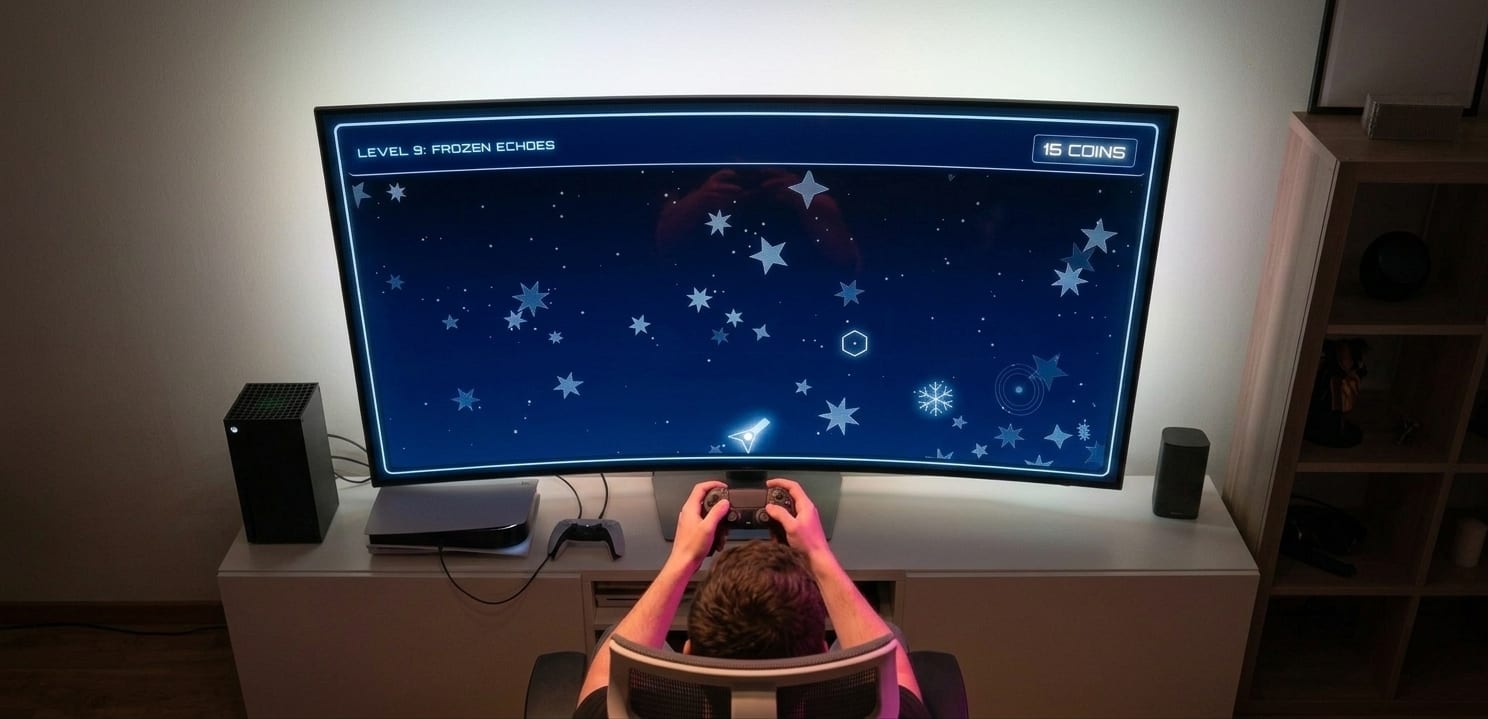
Here is how we achieved that stunning visual look using pure code:
1. The Frost Vignette and Scanlines
To make you feel like you are looking through the visor of a high-tech, freezing helmet, I used CSS (Cascading Style Sheets) to create overlays on the entire game screen.
The Scanlines: I added a subtle, shifting scanline effect over the screen. This makes the game look like it is being played on high-tech arcade monitor.
The Frost Vignette: I created a glowing, frosty border around the edges of the screen using an inset shadow (
box-shadow: inset 0 0 150px rgba(179, 229, 255, 0.15);). This brilliant crystal-blue color instantly makes the player feel the chill of the environment.
2. Procedural Snow and Ice Crystals
Unlike many other games, TeleGhostHunter does not use any image files (.png or .jpg). Every single thing you see on the screen is drawn with code in real-time.
The Snowflakes: I wrote a JavaScript function that generates 150 individual snowflakes, giving them random sizes, falling speeds, and a slight left-to-right drift to simulate a gentle, freezing wind.
The Ice Crystals: In the background, massive geometric ice crystals slowly rise. The code randomly calculates how many points each crystal has, its opacity, and how fast it rotates. This makes the background feel alive, deep, and beautifully complex.
3. The Ethereal Ghosts
The ghosts in Level 9 are not drawn as scary monsters. Instead, they are rendered as glowing, pulsating orbs of cold light. Using math (specifically the Sine function), I coded the ghosts to "breathe" or pulse in and out, creating an ethereal, ghostly visual that looks stunning against the dark blue background.
The Danger Factor: Why You Will Sweat in the Freezing Cold
Do not let the beautiful snow fool you. Level 9 is, without a doubt, the most dangerous and punishing level in the game. Here is why players are finding their hands sweating while playing a level entirely about ice:
1. The Relentless Speed
In the game's code, there is a variable called GHOST_TELEPORT_INTERVAL. In Level 9, I set this to exactly 700 milliseconds. That means you have less than three-quarters of a second to spot the ghost, move your mouse, aim your crosshair, and pull the trigger before the ghost vanishes and teleports to a new location. It requires absolute focus and lightning-fast reflexes.
2. The 90-Coin Mountain
To beat Level 9, you have to hit a TARGET_SCORE of 90 coins. Standard ghosts are worth 1 coin, while the rare, spinning Ice Anomalies are worth 5 coins. Reaching 90 points takes endurance. You cannot just get lucky; you have to play perfectly for an extended period of time without losing your rhythm.
3. Punishing Misses
The game tracks every single shot you take. If you click on empty space, you trigger a "MISS" event. Not only does this hurt your final accuracy score at the end of the level, but the game also plays a low, hollow wind sound and displays a dark text warning. The psychological pressure of trying to maintain a high accuracy rating while dealing with 700-millisecond targets makes Level 9 a high-stress, highly rewarding environment.
Under the Hood: The Technology Powering the Magic
So, how did we actually build this? What tools does a modern web game developer use to create something this smooth and responsive? The answer might surprise you: no game engines were used. No Unity, no Unreal Engine.
Level 9 is built entirely using the standard languages of the web: HTML5, CSS3, and Vanilla JavaScript.
The HTML5 Canvas API
The core of the game takes place on an HTML <canvas> element. Think of the canvas as a blank digital chalkboard. Sixty times every second, my JavaScript code wipes the chalkboard completely clean and redraws everything from scratch.
It draws the deep blue cave gradient, paints the 150 snowflakes in their new falling positions, draws the spinning ice crystals, paints the glowing ghost, and finally, draws the player's targeting reticle. Because JavaScript is incredibly fast, this happens so quickly that your eyes perceive it as buttery-smooth animation.
Procedural Player Design
One of my favorite tech features in Level 9 is the Hunter vehicle at the bottom of the screen. Instead of drawing a picture of a gun, I used code to draw geometric lines (ctx.lineTo and ctx.fill). Even better, I used trigonometry (Math.atan2) to calculate the angle between the player's vehicle and the mouse cursor. As you move your mouse to aim at the ghosts, the entire cannon barrel rotates to track your movements perfectly.
The Particle Explosion System
When you successfully freeze a ghost or shatter an anomaly, you see a burst of particles fly across the screen. This is managed by a custom Particle System. When a hit is registered, the code instantly generates 20 tiny circles, assigning them random velocities (speeds) in random directions. The system then slowly decreases their "life" over time, making them fade out and shrink, creating a perfect, satisfying explosion of ice.
The Audio Engine: Synthesizing the Sounds of Silence
A great action game needs incredible sound design. For Level 9, I wanted the audio to feel as cold, lonely, and high-tech as the visuals.
Instead of uploading pre-recorded sound files (MP3s), I utilized the browser's built-in Web Audio API. This API allows developers to literally create sound waves using pure mathematics.
I built a custom GameAudio object with an AudioContext. Depending on what happens in the game, the code generates different types of waveforms:
Shooting: When you click, the code generates a
sawtoothwave that rapidly drops in pitch, creating a perfect retro "pew-pew" laser sound.Missing a Target: If you miss, the game generates a low
trianglewave that mimics the sound of empty, hollow wind blowing through an ice cave.Shattering an Anomaly: When you hit a 5-point anomaly, the code creates a high-pitched
squarewave that sounds like glass or crystals shattering into a thousand pieces.
The Robotic Voice Over
To add to the lonely, high-tech atmosphere, I integrated the Web Speech API. This allows the game to talk to the player using the device's built-in text-to-speech engine.
When you start the level, the game physically speaks to you: "Cryo-sensors active. Hunt begins". When you hit a target, it calmly states: "Target frozen". By adjusting the pitch and rate variables in the code, I made the voice sound slightly robotic, calm, and emotionless—the perfect AI companion for a dangerous mission in the absolute zero sector.
The Player Experience: UI, Stats, and Feedback
Finally, a massive part of game design is how you reward the player. In Level 9, I overhauled the user interface (UI) to be as rewarding as possible.
I chose the Orbitron font from Google Fonts because of its blocky, futuristic, sci-fi appearance. When you hit a target, massive text appears on the screen: FROSTBITE or ECHO SHATTERED. I added CSS animations to the anomaly text so it physically shimmers on the screen, making the player feel incredibly powerful for hitting a difficult target.
Once the grueling 90 coins are collected, the game doesn't just say "You Win". It presents a beautiful modal window titled "CRYSTALLINE ASCENSION". It gives the player a complete breakdown of their performance: Ghosts Frozen, Anomalies Shattered, Shots Fired, Shots Missed, and their overall Accuracy percentage.
This stats screen is crucial. It gives players a reason to play the level again. Sure, you beat Level 9, but did you do it with 80% accuracy? Can you do it with 95% accuracy? It turns a simple web game into a highly replayable arcade experience.
Final Thoughts from the Developer
Building Level 9: Frozen Echoes was an incredible journey. It challenged me to take the core mechanics of TeleGhostHunter and present them in a completely new, thematic way.
By relying on raw JavaScript, mathematical animations, and synthesized audio, we managed to create a level that is extremely lightweight (it loads instantly in any browser) but feels like a premium, atmospheric action game.
It is beautiful to look at, incredibly cool in its theme, and brutally dangerous to play.
Thank you to everyone who has played the game so far. Put on your headphones, turn off the lights, and see if you have the reflexes required to master the echoes of the absolute zero. Good luck, Hunters!